Skip to content
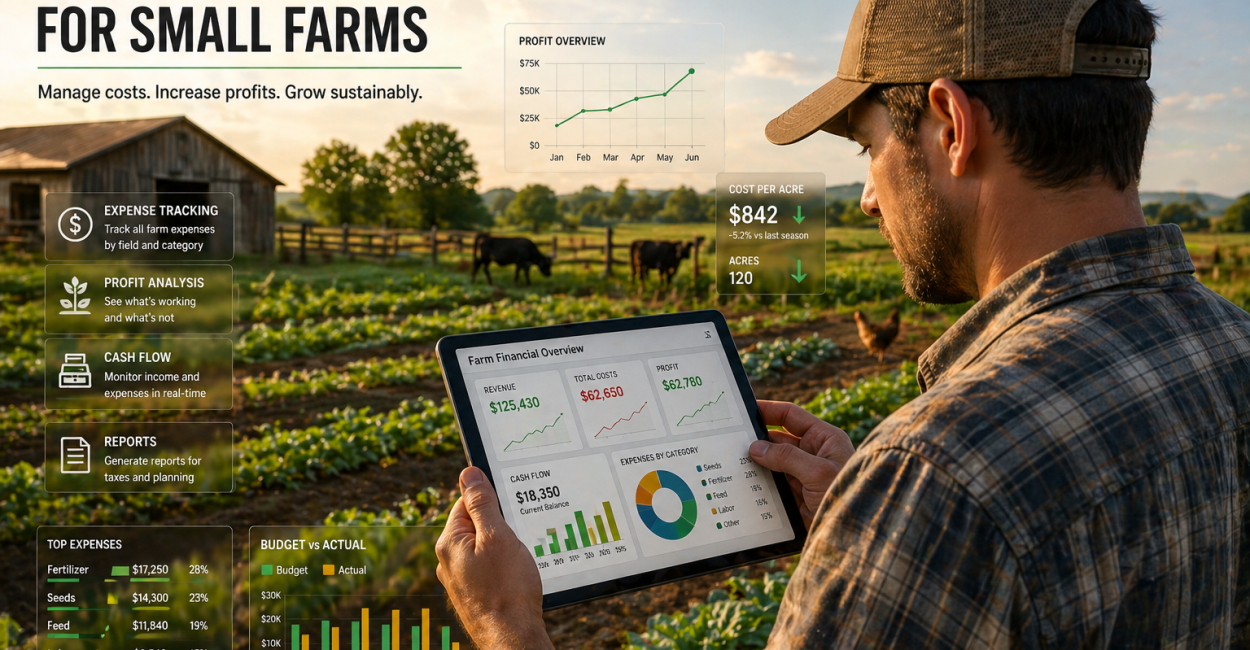
Finding the best farm management software for small farms in 2026 is no simple task. The landscape of agricultural technology is crowded with options built primarily for large-scale operations, leaving many family farms and diversified growers struggling to find tools that fit their needs and budgets. Small farms—those running under 500 acres—require software that is practical, affordable, and easy to use in real-world conditions, not just flashy features designed for megafarms. This article dives into what small farms truly need from farm management software and offers an honest comparison of the top solutions available today.
Whether you manage a mixed livestock and vegetable operation, a row crop farm, or a specialty produce farm, the right software can transform your daily workflow. From field mapping and activity logging to expense tracking and weather monitoring, farm management platforms are evolving quickly. But many farmers face challenges with overcomplicated interfaces, hidden costs, and poor offline functionality. Here, you’ll get clear guidance on which platforms deliver the most value for smaller-scale farms in 2026, backed by practical experience and detailed analysis.
The Essentials You Should Know
- Most small farms need farm management software with mobile-first design, offline capabilities, and simple field mapping rather than costly precision ag features.
- Platforms like Farmbrite and Farmable excel in serving mixed operations and small grain or vegetable farms by focusing on usability and comprehensive record-keeping.
- Livestock-focused operations benefit most from AgriWebb’s pasture rotation and compliance tools, while row crop farms gain financial insight with Bushel Farm’s grain marketing features.
- Migration from spreadsheets should start with current-season data and field boundaries to avoid losing valuable records.
- Beware of platforms that hide pricing behind demos or lack offline functionality; these are red flags for small farm users.
What Small Farms Really Need from Farm Management Software in 2026
Farm management software (FMS) designed for small farms must address practical challenges that differ considerably from those faced by large-scale commercial operations. Enterprise-grade platforms often assume access to GPS-enabled machinery, multiple employees, and dedicated data managers—resources many small farms don’t have. Instead, small farms require essential features that fit their realities: quick and accurate field mapping, simple activity logging, expense tracking, and localized weather data accessible via smartphone—even with spotty internet.
These farms typically prioritize ease of use over advanced analytics. For example, drawing rough field boundaries on a mobile device, recording planting or spraying events in under two minutes, and tracking expenses by field are core necessities. Offline access is non-negotiable because many rural areas lack reliable cell service. Additionally, onboarding should be straightforward enough for one person to complete on a weekend without formal training. Features like livestock health records or CSA management are nice-to-haves depending on the farm’s focus but rarely dealbreakers.
“Small farms succeed with software that works in the field, not just in a demo—mobile-friendly, offline-capable, and simple enough to use every day without frustration.”
In-Depth Comparison of the Top 8 Farm Management Platforms for Small Farms
Choosing software means balancing features, pricing, and usability. Here’s a detailed look at eight standout platforms tailored to small farm needs, highlighting who each serves best and the trade-offs involved.
| Platform | Starting Price | Best For | Mobile App | Livestock Support | Crop Support |
|---|---|---|---|---|---|
| Farmbrite | $19/mo (Lite) | Mixed farms, CSA, livestock + crop | ✓ | ✓ | ✓ |
| AgriWebb | ~$50/mo | Cattle/sheep operations | ✓ | ✓ | Limited |
| Bushel Farm | Free base (with Bushel Business Account) | Row crop, grain marketing | Limited | ✗ | ✓ |
| Conservis | $450–$3,995/yr | Row/permanent crops, financial mgmt | Limited | Limited | ✓ |
| Farmable | Freemium | Small grain/produce farms | ✓ | Limited | ✓ |
| Croptracker | CA$5/mo basic | Fruit, vegetable, specialty crops | ✓ (basic) | ✗ | ✓ |
| Trellis | Custom pricing | Input cost management | ✓ | Limited | ✓ |
| FarmOS | Free self-hosted / $19/mo hosted | Tech-savvy, organic, research | ✓ | ✓ | ✓ |

How to Choose the Right Farm Management Software for Your Specific Farm Type
Not all farms are alike, and your choice in software should reflect your operation’s unique demands.
- Livestock Farms: AgriWebb shines for cattle and sheep with its pasture management and compliance tools. Farmbrite is a strong all-around choice if you have a mixed enterprise.
- Vegetable and Produce Farms: Croptracker stands out for food safety traceability and audit compliance, essential for selling to retailers or certified organic markets.
- Row Crop Farms: Bushel Farm’s grain marketing integration and financial tracking are vital for corn, soybean, and wheat producers. Conservis suits farms that handle frequent crop insurance claims and need precision records.
- Orchards and Specialty Crops: Croptracker’s harvest quality features are top-notch, while Farmbrite supports smaller orchards with diverse needs.
- Mixed Operations and CSA: Farmbrite’s all-in-one platform manages livestock, crops, and direct sales efficiently.
- Beginners and Spreadsheet Users: Farmable offers a gentle introduction with quick logging and simple mapping, perfect for small-scale farms new to digital tools.
“The best farm management software is the one that fits your farm’s specific workflows, not the one with the flashiest demos or expensive features you won’t use.”
Step-by-Step Guide to Migrating from Spreadsheets to Farm Management Software
Transitioning from spreadsheets to farm software can feel daunting, but breaking it down makes the process manageable.
- Start small: Focus on current-season data rather than importing years of historical records immediately.
- Backup all data: Export existing spreadsheets as CSV files and store them safely in the cloud.
- Set up field boundaries first: Draw your fields on the software’s map; this anchors all subsequent data.
- Import master lists: Add livestock inventories, crop plans, and equipment details to reduce future data entry.
- Log real activities: Record actual farm events early to make the software part of your routine.
- Use the software for 30 days: Build muscle memory before judging whether it fits your workflow.
- Import historical data selectively: Once comfortable, add 2–3 years of past records if needed for analysis.
Common Red Flags to Avoid When Selecting Farm Management Software
Not all farm software is created equal. Watch out for these warning signs that a platform may not meet your small farm’s needs:
- Demo-heavy sales process: If basic features require a long live demo, the real app might be less user-friendly than advertised.
- Hidden pricing: Platforms that don’t show prices upfront often target larger operations or rely on sales tactics unsuited for small farms.
- No offline mode: Without offline capability, software fails where you need it most—in the field.
- Data lock-in: Ensure you can export your farm data in standard formats at any time to avoid vendor lock-in.
- Slow customer support: Farming demands timely answers; long delays can cost you money or crops.
- Free trials requiring credit cards: Trials should be risk-free; requiring payment info upfront is a red flag.
- Stagnant app updates: Lack of updates for six months or more may signal neglect or limited support.
Pricing Realities and What You Actually Get with Free Vs. Paid Plans
Farm management software pricing varies widely, and “free” doesn’t always mean full functionality. Understanding these distinctions helps you pick the right plan without surprises.
- Bushel Farm: Offers a solid free tier linked to a banking account but monetizes grain data relationships; advanced features require paid add-ons.
- Farmable: Its freemium plan covers basic logging and mapping; financial reporting requires paid upgrades.
- FarmOS: Fully functional when self-hosted (free), but requires technical setup; hosted version starts at $19/month.
- Croptracker: Basic audit and traceability tools start at CA$5/month, with higher tiers needed for full compliance automation.
- Farmbrite: No permanent free plan, but offers a 14-day no-credit-card trial to test all features.
- AgriWebb and Conservis: Free trials only; pricing scales with herd size or farm acreage, potentially expensive for smaller operations.
Choosing free or paid depends on your farm’s complexity and budget. Use free tiers or trials to test usability and core features before committing to a subscription.
How to Make the Most of Farm Management Software on a Small Farm
Software alone won’t improve your farm unless it fits your workflow and you commit to consistent use. Here’s how to maximize the benefits:
- Start simple: Focus on logging essential activities first—planting, spraying, expenses—before diving into advanced analytics.
- Use mobile apps daily: Record data in real-time rather than waiting until you’re back at a computer.
- Leverage weather and field-level data: Use localized weather insights to time field operations better.
- Review reports monthly: Analyze expense tracking and field productivity regularly to spot trends and areas for improvement.
- Don’t be afraid to switch: If a platform feels cumbersome after 30 days, try another that aligns better with your farm’s needs.
“The value of farm management software comes from daily use, not just setup. Consistency transforms data into actionable insights that boost profitability.”
Next Steps for Choosing and Implementing Your Farm Management Software
Small farms looking to adopt farm management software in 2026 should begin by evaluating their specific operational needs against the strengths and limitations of available platforms. Prioritize mobile-friendly software with offline capabilities and simple onboarding. Take advantage of free trials or freemium models to test usability in the field. Start with core features—field mapping, activity logs, expense tracking—and expand as your comfort grows. Remember, the best software is the one you actually use consistently and that helps you make better decisions on your farm.
Testing two or three platforms with your day-to-day operations before committing will save time and frustration. With the right tool, managing your small farm becomes more efficient, less stressful, and more profitable.
Frequently Asked Questions
What Features Should Small Farms Prioritize When Choosing Farm Management Software?
Small farms should focus on mobile-first design with offline functionality, easy field mapping without the need for GPS precision, quick activity and input logging, and basic expense and income tracking by field. Localized weather data is also essential. Features like livestock health records or CSA management are useful depending on the farm’s focus but not mandatory for all. Avoid overcomplicated precision ag tools that require expensive equipment.
Is It Necessary to Move All Historical Data When Switching from Spreadsheets to Farm Software?
No, it’s not necessary to transfer all historical data at once. The best approach is to start with the current season’s data and keep older records backed up separately. Import only the last 2–3 years of historical data selectively once you’re comfortable with the new system. This reduces setup time and avoids overwhelming the software or user with unnecessary past data.
Are Free Farm Management Software Plans Enough for Small Farms?
Free plans and trials can provide good basic functionality, such as activity logging and simple field mapping. However, many free tiers limit reporting, data volume, or advanced features, which may prompt upgrading to paid plans as the farm grows or requires more detailed insights. Assess your farm’s complexity and test free options thoroughly before deciding on a paid subscription.
How Important is Offline Functionality in Farm Management Software?
Offline functionality is critical for small farms, especially those in rural areas with spotty or no cell coverage. Software that works without internet allows farmers to log activities and access data directly in the field, preventing data loss and workflow interruptions. Without offline mode, software may become unusable during crucial farm operations.
What Are the Risks of Vendor Lock-in with Farm Management Software?
Vendor lock-in occurs when you cannot export your farm data in standard formats, making it difficult to switch platforms or back up records independently. This can lead to loss of control over your valuable farm data. Choosing software with transparent data export policies and open standards—like FarmOS—helps avoid this risk and ensures long-term data ownership.